
Automated Refresher ensures learners regularly revisit critical training without manual re-enrollment. This feature automatically reassigns an eLearning course on a recurring basis based on the learner’s previous completion date, supporting ongoing compliance, knowledge reinforcement, and skill retention.
Once set up, the system automatically manages re-enrollment and tracks each refresher as a new learning instance. This reduces manual administration while ensuring learners are re-enrolled at the right time and never miss required training.
✅ Setting It Up
1. In the Admin Dashboard, go to Content > eLearning / Video.
2. Edit the eLearning you wish to set as recurring.
3. Tick the Recurring checkbox, then set the following:
- Interval in Months - the period after which the learner must take the eLearning
- Days Before Auto Enroll - number of days before the user is automatically enrolled. For example, if set to 7, the user will be automatically enrolled 7 days before the eLearning due date.
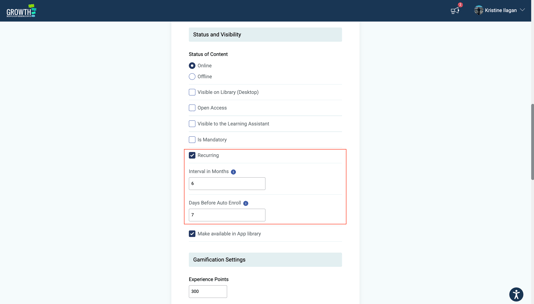
4. Click the Save Changes button.
💻 What Learners Can Expect
-
When the Days Before Auto-enroll threshold is reached, the eLearning is automatically added to the learner’s My Things To Do list.
-
From the second recurrence onwards, learners will see a Due Date displayed for the eLearning after they are auto-enrolled.
-
If the learner does not complete the eLearning by the due date, the activity will be marked as Overdue.
🗂️ Reporting
eLearning Report
-
The Recurring column indicates whether an eLearning is set as recurring. A value of 1 means yes.
-
The Expires At column shows the corresponding due date.
-
Admins can view completion records for each refresher occurrence.

Data Visualisation
-
eLearning report in Admin and Manager Data Visualisation indicate whether an eLearning is recurring.
-
Admins can also view completion records for each refresher occurrence.
✍🏻 Wrapping Up
Automated Refresher simplifies the management of recurring training by handling re-enrollment and tracking automatically. Once set up, learners are re-enrolled at the right time, while admins reduce ongoing manual effort.