
Curricula on App allows learners to access and complete structured learning paths directly from the mobile app. This feature mirrors the curricula already configured in the LMS (web), but delivers a more seamless, mobile-native learning experience.
📱How It Looks on App
🔄 Content Support & Cross-Platform Access
App-Supported vs Non-App-Supported Content
- Learners will be able to see all content included in a curriculum on the app.
- Only app-supported content types can be launched and completed directly in the app.
What Happens with Non-App-Supported Content
- If a learner taps a content item that is not supported on the app, they will see a prompt: “Content not supported in app. Please use the LMS.”
- The learner can then switch to the LMS (browser) to continue.
LMS Behavior (Parity)
- The same principle applies on the LMS:
- All curriculum content is visible.
- Content that is not supported in a given experience will prompt the learner to access it in the appropriate platform.
This ensures learners always understand where a piece of content can be completed, without blocking visibility or progress.
⚙️ Admin Experience: Managing Curricula
Curriculum Setup
- Curricula are still created and managed in the LMS (web)
- Existing workflows remain the same
App Availability
- Admins must enable the checkbox “Make Available in the App” for a curriculum to appear on the app.
- This applies to:
- Newly created curricula
- Existing (previously created) curricula
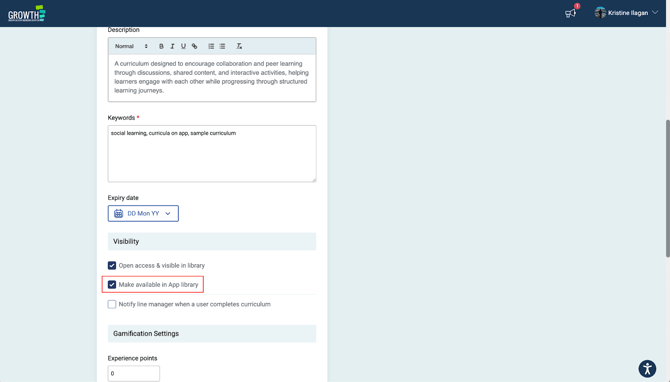
Once enabled, the curriculum will be visible to learners on the app, subject to assignment and content support.
⏭️ What’s Next?
Curricula on App is an important step towards creating a more seamless learning experience across the LMS and the app. While some content types are currently app-supported, we’re actively working towards unifying content so that all learning experiences can be accessed consistently on both platforms.
If you have any questions, need guidance, or would like help optimising your curricula for the app, please reach out to your Customer Success Manager, they’ll be happy to support you.