
The Direct Event Course Link feature allows admins to copy and share a direct link to a specific event course, making it easier for learners to find and register for available sessions.
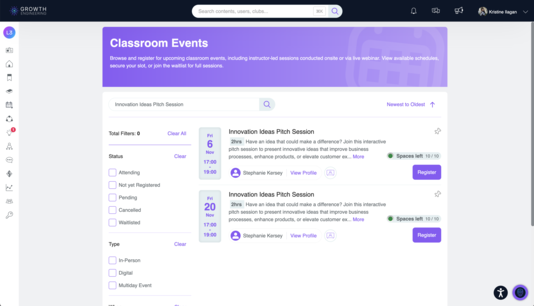
When learners access the shared link, they are automatically directed to the Events page, filtered by the relevant course title. This allows them to view all available schedules for that course and register for the session that best suits their availability.
By providing direct access to relevant event sessions, this feature simplifies event discovery and creates a more seamless registration experience for learners.
🛠️ How to Share a Direct Event Course Link
1. Go to Admin > Contents > Events.
2. Go to Courses tab.
3. Copy the link by clicking the Copy Link icon of the course you wish to share.
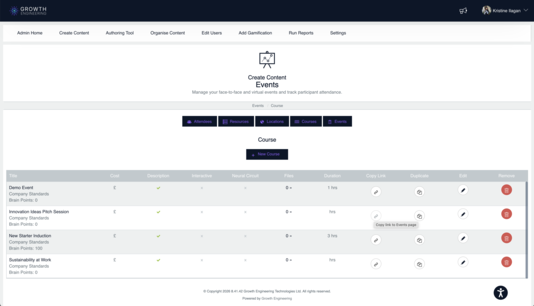
4. Share the link.
👀 How It Looks for the Learner
1. Access the Shared Link
When learners click the shared course link, they are automatically directed to the Events page, with the relevant course title already applied as a filter.
2. View Available Sessions
Learners can browse the available schedules for the selected event course without needing to manually search for it.
3. Register for a Preferred Session
Learners can select a session that suits their availability, view its details, and proceed with registration through the usual Events registration process.
📘 You're All Set!
The Direct Event Course Link feature makes it easier to share event courses and helps learners quickly find and register for their preferred sessions. By providing direct access to relevant event schedules, admins can simplify event sharing while creating a smoother registration experience for learners.