
The eLearning Due Date feature allows admins to define when a course must be completed by learners. By setting a due date, admins can ensure timely completion of required training, support compliance requirements, and provide learners with clear expectations on deadlines.
Once configured, due dates are visible to learners and can be tracked to identify overdue activities. When a learner is overdue, an email notification will be sent to their manager.
⚙️ Admin Setup
1. In the Send Invites page > eLearning tab, select the Users and eLearning title.
2. On the next page, set the Due Date.
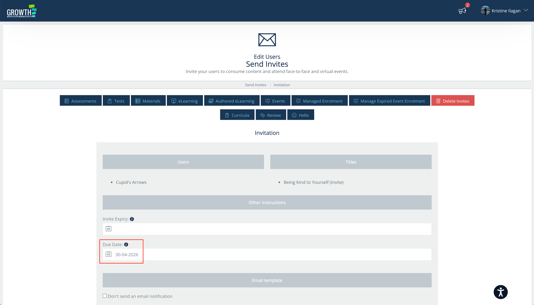
3. A dynamic tag #DUE_DATE# can also be added in the email template.
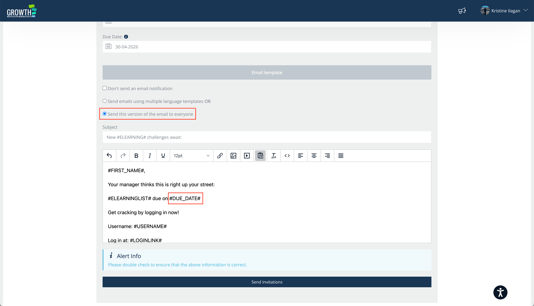
✅ Make sure to select the "Send this version of the email to everyone."
4. Click on Send Invitations button.
💻 What Learners Can Expect
- The eLearning with Due Date will appear in their My Things To Do.
- If the due date passes without completion, the eLearning will show as Overdue.
- Overdue items remain visible until the learner completes the course.
🔔 Manager Notifications for Overdue eLearning
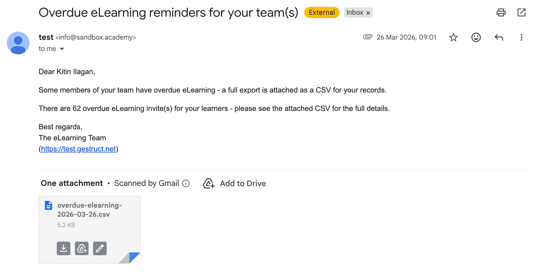
Managers receive notifications when a learner’s eLearning becomes Overdue, allowing them to quickly identify missed deadlines and take appropriate follow-up actions. The notification is triggered once the due date has passed and the eLearning remains incomplete, helping managers support timely completion and maintain compliance.
The email notification includes a list of affected learners, along with the eLearning title and corresponding due dates for easy reference.
✅ Key Takeaways
Due Dates and Manager Notifications work together to help ensure eLearning is completed on time. While due dates provide learners with clear deadlines and visibility of their responsibilities, manager notifications enable timely follow-up on overdue training.
Together, these features support better accountability, improve completion rates, and reduce the need for manual tracking by keeping both learners and managers informed.