
Theme manager is the place to bring your epic meaning life! This allows you to customise the look and feel of your LMS to reflect your organisation's visual identity. From logos and imagery to theme colours and fonts, these settings help create a consistent branded experience across both Admin and learner-facing areas of the platform.
🗂️ Branding Settings Overview
Banners
This is where you can update images on Banners, set transitions/slideshow speeds. Add images to appear as banner pages on your dashboard. You can add as many images as you like but we would tend to keep this to 4-6. Note: these will show for all users and not filtered through content groups or hieararchy.
Colours
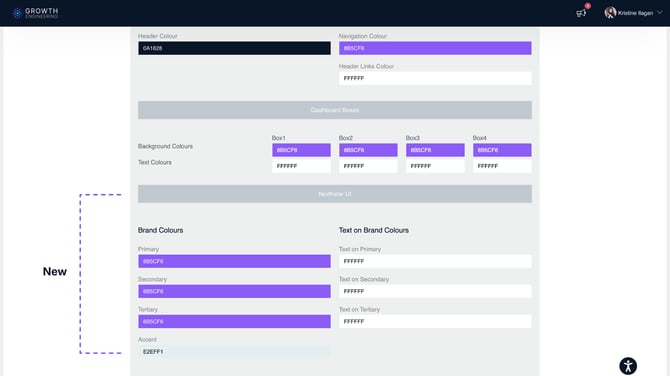
Where you can change background colours to match brand as well as dashboard boxes. Try using Adobe Colour Wheel or Hex codes – these can help you find your colour codes needed to match your brand.
Fonts
This is where you can change fonts on the platform. At the moment there is only a 5 different fonts but we can add more fonts on if required and with future developments for the platform, there will be more choice of fonts.
Effects
This is where you can add effects to your platform. At the moment, there is just confetti which you can switch on and off but there will be more coming to the platform soon.
Identity
This is where you can upload images for your Company Logo and Favicon (icon which appears on the internet browser tab). Please take a note of the type of file that works best.
Branding support has been extended across Admin and learner New UI pages, including both theme colours and fonts. This enhancement delivers a more consistent and cohesive branded experience throughout the platform, ensuring your organisation’s visual identity is reflected across more areas of the LMS.
🎨 Next Steps
Once your branding settings have been configured in the Theme Manager, the selected logos, colours, and fonts will be applied across supported areas of the LMS. Review your branding regularly to ensure it remains aligned with your organisation's visual identity and user experience requirements.
We recommend to review the LMS design guidelines for dimensions.