
The AI-powered assistant is designed to improve your learners’ experience by giving them quick and accurate answers inside the LMS.
Unlike internet-based chatbots, it only responds using the content you provide—such as eLearning modules, PDFs, FAQs, and defined URLs—so information stays relevant and reliable.
Your learners can ask questions in natural language and instantly receive helpful responses, whether that’s guidance, step-by-step instructions, or quick reference information. This keeps them engaged and reduces the time they spend searching for answers.
As an admin, you’re in control of the training data: upload your own materials, add FAQs for precise answers, or point the assistant to specific URLs to expand its knowledge base.
See how it works in the video below, or read through our detailed guide.
👷 Accessing the Learning Assistant
The AI Learning Assistant is accessible through an avatar bot.
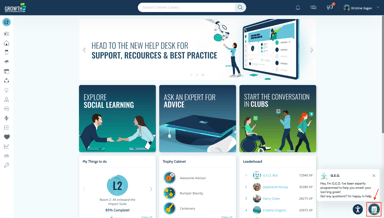
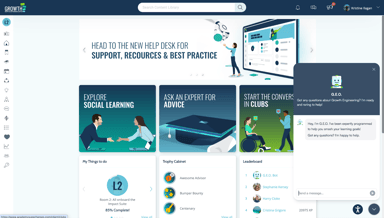
⚙️ Admin Setup
For a Material content to be available in the bot’s knowledge base,
- Go to Admin Dashboard
- Click on "Content", then select "Material"
- On the form, check the "Visible to the Learning Assistant"
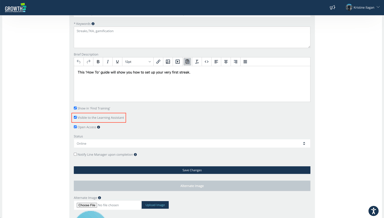
For an eLearning content to be available in the bot’s knowledge base,
- Go to Admin Dashboard
- Click on "Content", then select "eLearning / Video"
- On the form, check the "Visible to the Learning Assistant"
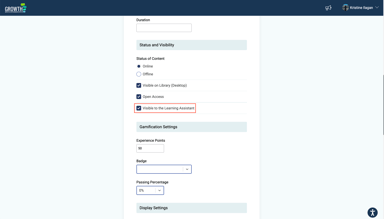
What is added to the Knowledge Base?
- eLearning: title, description, url
- Materials: title, description, url, PDF file contents (for every file)
More content types will be supported in the future, making the assistant even more flexible.
Things to Note:
- Data added to the Knowledge Base makes it available to all users and doesn't adhere to the LMS content access controls at the moment.
- FAQs and URLs can be added only to the Knowledge Base through the help of Growth Engineering support.
🎉 That Covers It!
You now have a chatbot that learners can turn to anytime for support in their learning journey. By asking questions in plain language, they can instantly find answers, access resources, and stay on track—making learning more interactive and engaging.
🌟 Try It Out!
You can explore how it works in Academy Superheroes.
Here are sample prompts:
- What is gamification?
- Tell me about dopamine in learning
- Recommend content related to social learning
- Recommend webinars
📌 The AI Learning Assistant is a paid add-on feature. If you’d like to enable it for your platform, please contact your Customer Success Manager to learn more about pricing and activation options.