
Make learning smoother and faster with deep links. Admins can copy and share a unique link that opens the selected content directly in the app (if installed) or on desktop (if supported). It’s a quick way to guide learners exactly where they need to go.
✅ Supported Content Types for Deep Linking
Admins can generate and share deep links for the following content types:
-
eLearning / SCORM
-
Genie / Quest
-
Quick Content Document
-
Quick Content Link
🛠️ Managing and Sharing Deep Links
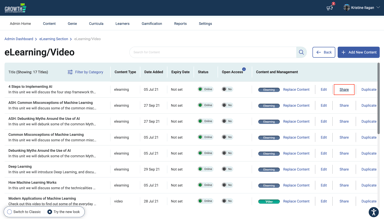
To copy an eLearning / SCORM link:
- Go to Admin > Content > eLearning / Video
- View a Section
- Click “Share” and it will automatically copy the link
Note:
- Currently, only eLearning files are supported. Deep linking for Videos is not yet available.
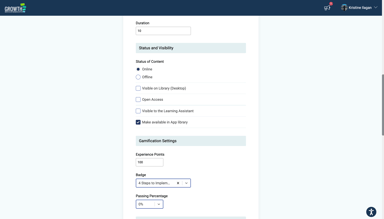
- Make sure the "Make available in App Library" is enabled in the form.
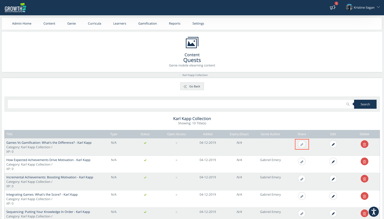
To copy a Genie / Quest Module link:
- Go to Admin > Genie > Quests
- View a Section
- Click Link icon and it will automatically copy the link
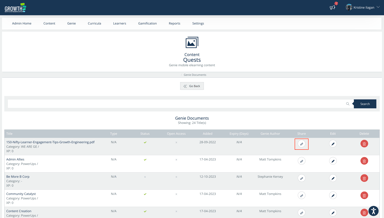
To copy a Quick Content Document link:
- Go to Admin > Genie > QuickContent Document
- View a Section
- Click Link icon and it will automatically copy the link
To copy a Quick Content Link link:
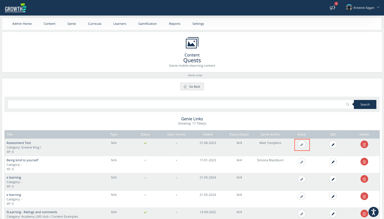
- Go to Admin > Genie > Links
- View a Section
- Click Link icon and it will automatically copy the link
🔍 What Your Learners See
- If the learning app is already installed, learners can choose to open on the app.
- If they choose to continue on web, they will only be able to view eLearning / SCORM contents. Other content types such as Genie / Quest and Quick Contents are currently not supported in the LMS.
- In case the app is not yet installed, learners can download the app from Apple Store or Google Play Store.
💡 Pro Tip
Make your deep links even more accessible by embedding them in QR codes. Learners can simply scan to open the content directly — no typing or searching needed.
🎉 All Set!
Deep linking makes it easier for learners to access exactly what they need — when they need it. Start sharing direct links today to save time and simplify navigation for your learners.