
eLearning ratings and comments are a way to add more interaction to the platform from your learners.
With this feature turned on, learners will be given a pop-up at the completion of video/eLearning, which allows them to rate + comment on that piece of Elearning.

As an admin, you can choose:
If this feature is turned on
When turned on, if the ratings are mandatory
When turned on, if comments are mandatory
You can update the ratings (scale 1-5) language in the language table
Talk to your CSM to set the feature on
In order to see the learning activity and the comments & ratings, you will need to assign the club as dedicated to the activity feed. We would recommend to create a new club for this with indicative name for this (such as Whats Happening; Learning Activity; All The Talk).
This can be done in the admin- clubs- edit - click to select this club as activity feed:

Once the set-up is in place, you can see the learning activity as below. You can also utilise all the normal features of the club such as commenting, liking, replying and tagging.
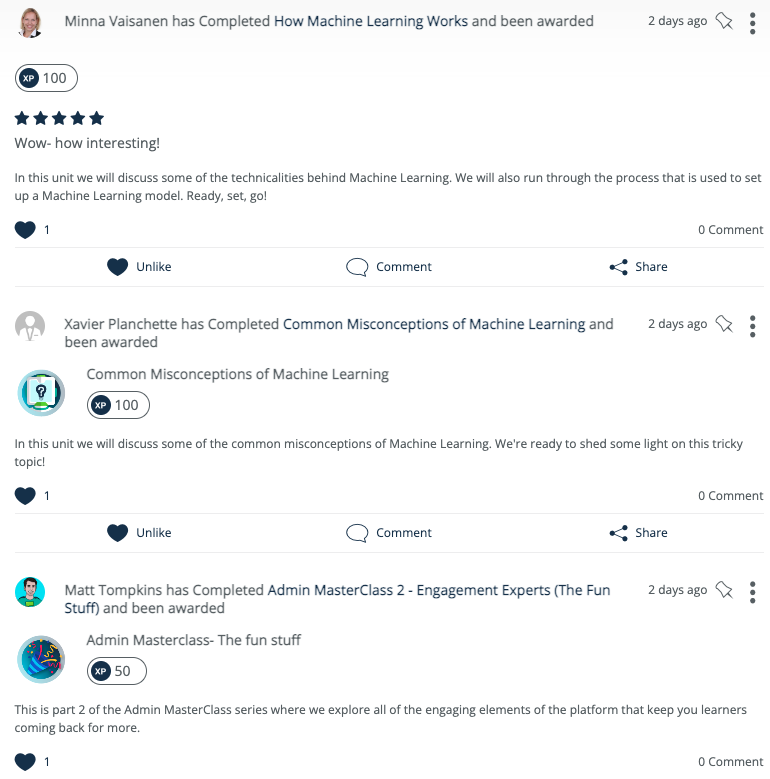
Happy learning activity!