
Here at Growth Engineering, we are advocates of Epic Meaning, which can be defined as the learner being able to identify your company and brand story within the platform.
One of the ways to achieve Epic Meaning is to customize the platform accordingly to your brand colors and images. In this article, we are sharing the Design guidelines to ensure your LMS is in tip-top shape and you can complete your customization seamlessly!
Let’s begin!
Colour Palette
Primary Colour
If aliens invade your LMS color palette and demand you ‘take them to your leader’, point them in this direction.
The primary color in your color palette will change the color in the header bar, therefore will be seen no matter where your learners navigate to on the platform. In most circumstances, this will be your main brand color or work as a brand color background to your organization’s logo.
Secondary Colour
Dr. Watson, Robin, and Chewbacca. The strangest collection of dinner party guests and sidekicks that complement their companion perfectly. That’s exactly the role of The Secondary Colour in your palette.
The Secondary color is used in multiple places across the platform, including the header text & icon for each page and highlighting separate categories of your library.
Highlights
From favorite literary quotes to flaws in our partners, we humans love to highlight things. Well, it’s your lucky day as we move on to highlighting all over your LMS!
Highlight 1
The Highlight 1 color choice will determine the color of your buttons across the whole platform so make sure this will catch your learner's attention!
Highlight 2
Highlight 2 will help to draw your learner's attention to the details. This will be used to indicate learner progress and content types.
Images on the platform
Favicon
This design element is something of an icon, literally! This is how your learners spot your LMS amongst a sea of open browser tabs!
Logos
Tigers mark their territory by leaving their scent. We’re a bit more civilized at Growth Engineering and all you have to do is upload a logo. This is your organization’s territory, go ahead and mark it!
Login Page
The login screen. Or as we like to call it, your gateway to learning paradise. We don’t really, people would think we’re a few modules short of a curriculum. However, that does mean it can’t look beautiful!
Dashboard Banner
When learners log into the LMS, you want to make a good impression! This is what they will see, is
it a point to start their learning journey, a link to access your latest company news, or just a friendly hello, YOU decide!
Top Tip: the best dimension for the banner is 400px x 1550px - and ensure that all the banners are equal size in height (400px)!
Promotional Widget images
Stop. It’s promo time!
Use these to highlight special occasions, draw users to specific content, or an out-of-platform URL.
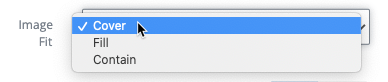
Top tip - Check out the dimension guidelines for the safe areas per the different styles of promotional widget size. You can also choose how the image is handled per each promotional widget (cover, fill or contain) > try it out to see which works best for your image!
Level Icons and Banner
Your LMS has some levels to it. Both emotionally and literally.
The level icon will let your user know when they have leveled up without having to visit the levels page. This will show up in the sidebar and on the My Things To Do dashboard widget. When visiting the full level page, let your learners know where they are and give your learners level page some pizazz with an eye-catching level banner.
Library categories
The Library is your training content hub! All the awesome content you create deserves to be housed in a Library bursting with beauty. Follow the guidelines below and your users will soon devour your Library categories...
Clubs
Create discussion groups based on the topics that matter to you and your organization and forge
a learning community. Each Club can be fully customized with a look and feel to represent the discussion points or various brands under your organization’s umbrella. Follow the guidelines and you’ll have a thriving learning community in no time...
Badges
Your LMS is bursting with gamification that will turbocharge engagement. As a result, your users will be eager to check out the fruits of their labor! Users will visit the Badge Cabinet to see the shiny Badges they’ve collected and those on their hit list.
There do you have it!