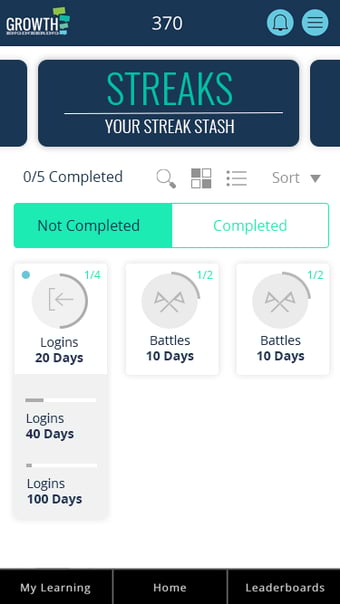
Streaks are an awesome piece of gamification functionality designed to reward learners for the positive outcomes you want to see from your training programme!
Currently Available Streaks:
Daily Log-Ins
Daily Content Completion
Lifecycle:
Admin creates the Streak in the web-based admin panel and sets the milestones, duration and XP available on completion.
The new Streak will appear in the Streaks area of the learner's badge cabinet. The first time they complete the action required, they will receive a notification that they have started the Streak.
A user initiates a Streak by completing the specified action.
If the user repeats this action the following day, then the system will recognise that the user did the same action the day before by referring to the counter and then add to this. This will be visualised to the learner via a notification and displayed in the Streaks area.
When the Streak reaches an admin determined milestone, this Streak will be awarded to the learner and appear as a specialised badge in the Streaks area of the badge cabinet. There will also be XP awarded based on the setup of the Streak.
If the user fails to achieve the action within the day, then when they log in, they will receive a notification that says that the streak has been broken. This will reset the counter to zero. Thus, any Streaks that have been achieved would remain achieved, but any Streaks in progress would be reset.
Any Streak which has reached its final milestone will remain as complete in the Streaks area and will be moved to the top of the list.
Notifications:
Notifications on the app are nondescript but clicking on the popup will take you to the Streak area (provided it is a Streak related notification). Learners will receive notifications relating to Streaks when:
Upon logging in, a notification will appear to tell the learner how far away they are from achieving their current Streak(s).
Upon achieving a milestone, the learner will receive a notification directing them to their Streak, receiving their badge and XP.
When a Streak is broken, the learner will receive the notification alerting them when they next log in.
Learners will not receive a standalone notification that a new streak is available. The best practice would be for admins to announce this on social feeds/clubs.
General:
Streaks apply to all learners on the platform, regardless of hierarchy or content groups.
Multiple Streaks can run at once - for example, an all-time daily login streak could run simultaneously as a five-day daily log in sprint. Logins would be counted toward both Streaks.
If an admin adds new milestones to an existing Streak and the learner has already achieved one of the milestones (for example, 300 logins), this will be awarded retrospectively.
When new Streaks are created, all learners will start on zero for that Streak only. This will not affect their progress within other Streaks.
The day is set to reset at 00:00 based on the app’s timezone. Only one timezone can be used for the entire user base.
Streaks can be set to exclude weekends.