
The News Scroller on App allows admins to publish announcements that appear directly to all users when they access the mobile app. This feature helps you highlight important updates, upcoming events, or platform updates to your entire learner base.
📣 Setting up the Announcement
1. Go to Admin Dashboard > Learners > Announcements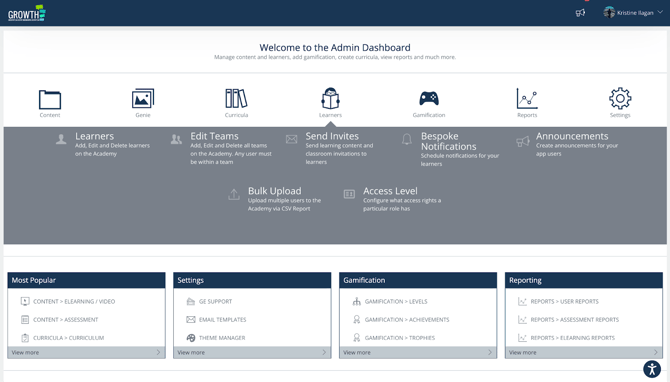
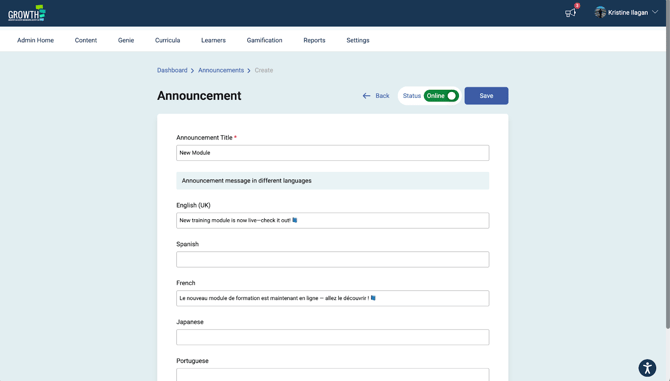
3. Add a title for the announcement.
4. Input the announcement message. If multiple languages are used, provide the message for each supported language.
🔍 Users will see the announcement in the language that is enabled for their profile.
5. Click on the “Save” button.
✅Make sure that the status of the announcement is Online.
📌Multiple announcements can be active at the same time.
To deactivate an announcement:
1. Click “Edit” on the announcement you wish to deactivate.2. Click on the “Online” switch to change it to “Offline”.
3. Click on the “Save” button.
OR
Simply delete the announcement. It will automatically deactivate the announcement.
📱How It Looks on the App
Announcements are displayed on top of the app’s Home menu, ensuring they are immediately visible to all users.
🎯 Wrapping Up
The News Scroller on App makes it simple to share timely updates with your entire user base. By publishing announcements directly on the app’s home menu, you can ensure important information is seen quickly and consistently.