
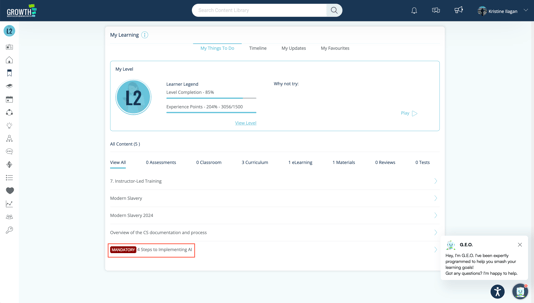
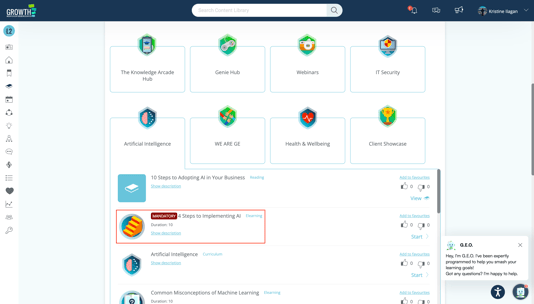
The eLearning Mandatory Flag allows admins to designate key courses as required. When a module is set as mandatory, learners will see a Mandatory label on that eLearning in both their My Things To Do and Learning Library folders, making it easy to identify and complete required content.
🪄 Configure the eLearning Mandatory Flag
1. Go to Admin Dashboard > Content > eLearning.
2. Choose a Section.
3. On the eLearning Form, whether you're creating a new eLearning or updating an existing one, check the Is Mandatory check box.
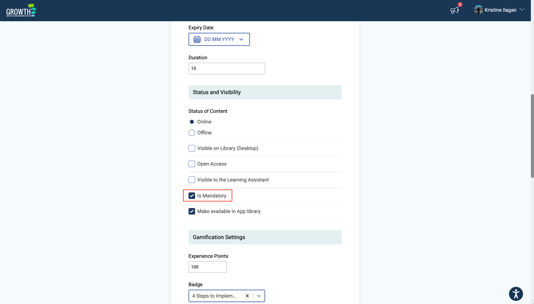
4. Click the "Save Changes" button.
👀 What Learners See on Their End
My Things To Do:
Content Library:
📈 Tracking Mandatory eLearning in Reports
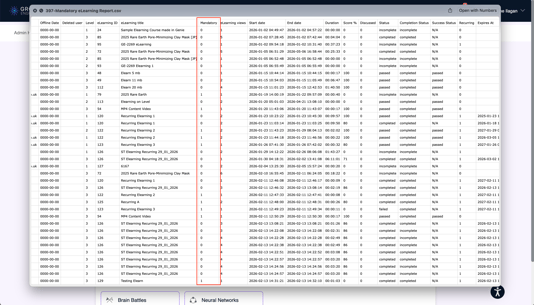
Reporting:
In the eLearning report, the Is Mandatory column shows whether an eLearning has been marked as mandatory. A value of 1 indicates “Yes,” meaning the eLearning is required.
Data Visualisation:
1. Access the Reports in the Admin Dashboard. Click "Data Visualisation".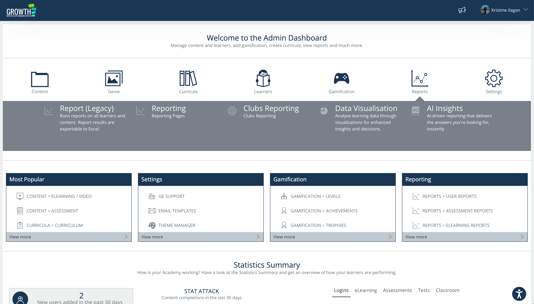
2. Click the "eLearning" tab and scroll down to eLearning and Genie Learner Progress visual.
3. You will see a column indicating if an eLearning is mandatory.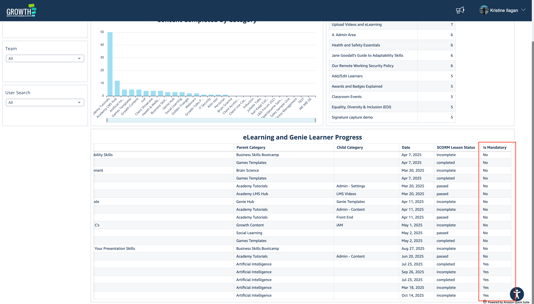
📘 Summary
Marking eLearning content as mandatory ensures key learning materials are prioritized and completed. Learners see exactly what’s required, and admins gain better control and tracking over essential training.